
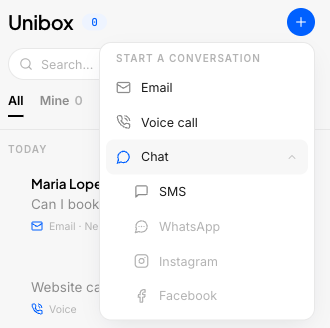
You can now start a new conversation from Unibox. Click the "+" in the header, pick a contact, pick a channel and send. Your first message goes out from the same inbox where the reply will land.
Before, Unibox only let you reply. If a customer never wrote to you first, you had to leave the inbox to reach them. Every extra step slows your outreach, and slow outreach loses leads.
Say you run a roofing company and a neighbor refers a new lead by phone. You want to text that lead now, while they still remember the referral. You can do it in a few clicks, without leaving Unibox.
Send the first message from Unibox
The "+" button sits on the right side of the Unibox header. Click it and the new conversation flow opens. To make room, the open filter moved to the left, next to the Unibox title.
How it works
- Search for a contact by name, phone number or email.
- Or type a new phone number or email. Nedzo creates the contact and the conversation in one go.
- Pick the channel: SMS, email, WhatsApp, Instagram or Facebook.
- For SMS, pick which of your numbers the text comes from.
- Write your message and hit send.
The new conversation shows up in Unibox and opens on its own, so you're ready when they reply.
No duplicate threads
Two threads with the same person means you miss context and repeat yourself. If you already talk to that contact on that channel, Nedzo opens the old thread instead of making a new one. The whole history stays in one place.
Nedzo also checks the phone number or email format before you send, so a typo doesn't send your message nowhere. If your account has no phone numbers yet, Nedzo turns off SMS and tells you why.
It's live in your account now.