
We rebuilt the Unibox, your shared inbox for every call, email, SMS, WhatsApp, Instagram, Messenger and website chat. It got a new look and a lot more power. You can clear a pile of conversations in one click, snooze what can wait, tag what matters and read call transcripts line by line.
Nedzo, your AI agent, also learned when to step back. And it now shows you why it did what it did.
A cleaner shared inbox for every channel
A busy inbox hides the one message that matters.
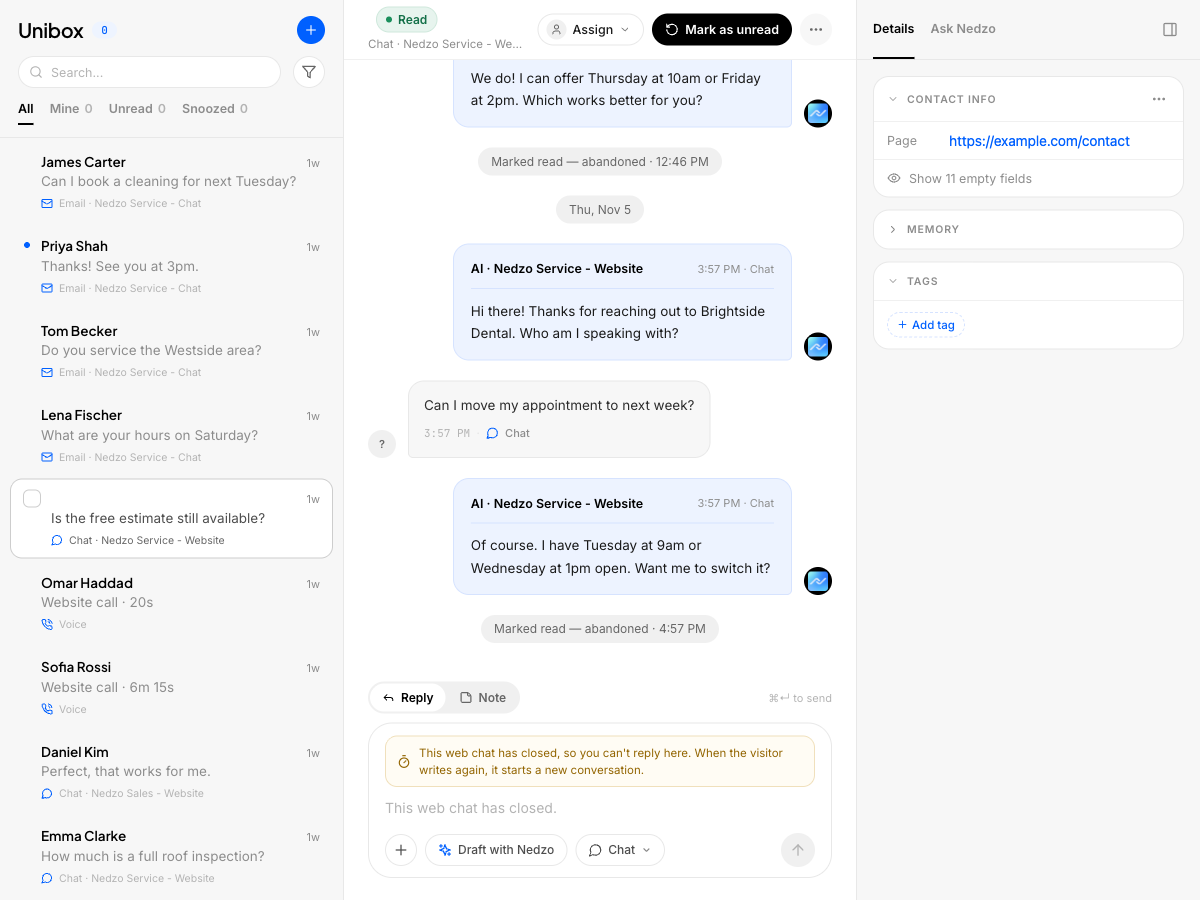
The new Unibox has four tabs: All, Mine, Open and Snoozed. Mine, Open and Snoozed each show a live count. Conversations sit under Today, Yesterday and Earlier, and a blue dot marks the ones you haven't read.
Customer messages sit on the left. Replies from Nedzo and your team sit on the right.
One reply box that fits the channel
The reply box changes with the channel. Email gets Cc and Bcc. SMS shows how many segments your text uses. On WhatsApp, once the 24-hour window closes, it points you to an approved template. A call gives you a Call back button. Switch to Note to write something the customer never sees.
Stuck on what to say? Hit the draft button and Nedzo writes a reply right in the box. You read it, fix it and send it.
Small things that save you time
- Shortcuts: c to compose, / to search, Cmd+Enter to send
- Resolve, assign, snooze and tag update on screen right away, and resolve and delete come with undo
- An empty inbox shows three cards: conversations resolved today, your median first response time, and the share of conversations Nedzo handled
Bulk actions in the inbox
Closing old chats one at a time eats your morning. Now you do it in one go.
Tick a box, shift-click to grab a range, or press Cmd+A. "Select all in Open" picks every match in the tab, including rows you haven't scrolled to yet.
Then act on all of them: resolve, assign, snooze, add a tag, delete or block senders. If a few fail, the Unibox tells you which ones and why. Delete asks first and comes with undo.
Snooze conversations
Some conversations can't move today. Snooze them and pick when they come back.
The conversation leaves your list and waits in the Snoozed tab. At the time you picked, it returns to Open on its own. If the customer writes back first, it wakes up right away.
Tag conversations
Tag a conversation from the Tags card on the right, or tag a whole batch with bulk actions. Conversation tags use the same tag list as the rest of your workspace.
A tag sticks to that one conversation. Tag one chat "refund" and the customer's other chats stay untagged.
Clickable call transcripts
Hunting through a long recording for one sentence wastes your time.
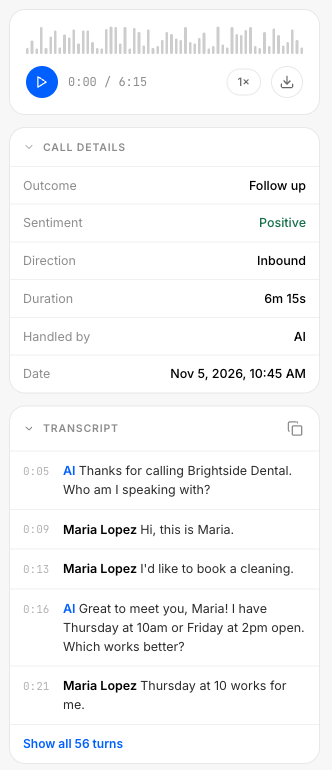
Click a call in the thread. You get the recording, sentiment, outcome, who handled it, a summary and the transcript.
On new calls, every line of the transcript has a time. Click a line and the recording jumps there. If the caller asked about price, find that line, click it and listen.
You can copy the full transcript with one click, or download it from the thread menu. Downloads work for email, SMS, WhatsApp, Instagram and Messenger threads too.
Cc, Bcc and reply all on email
A customer emails your support address and copies two coworkers. Until now, your reply went to the sender alone. Now you can reply to everyone on the thread and add Cc and Bcc. Bcc stays hidden from everyone else.
Instagram story replies and the 24-hour window
Someone replies to your Instagram story with "Do you ship to Canada?" Ship what? Now the Unibox shows the story they replied to, with a thumbnail.
Meta gives you 24 hours after a customer's last message to reply on Instagram and Messenger. Miss it and your reply fails. Now the reply box counts down the time left, like "Window closes in 6h 12m." Once it closes, Nedzo blocks the send and tells you why.
Take over a website chat from the AI
A visitor asks Nedzo something only you can answer. You jump in from the Unibox and type. Your reply now shows up in their chat widget, marked as a reply from a person. If the visitor already left, you get a clear error instead of a "sent" that never arrived.
Route calls to AI or a person, per number
Every phone number now has one setting for who answers. Pick the AI and your Nedzo agent takes the call. Pick Human and the call rings your team. You can ring everyone at once, or use round robin so they take turns.
If nobody picks up, the caller hears an unavailable message. The call lands in the Unibox as a missed call and stays open, so someone calls back.
Hand off to a teammate, or tell Nedzo to stop
Procedures are the steps Nedzo follows when a conversation matches a rule. They got two new actions.
Assign to user hands the conversation to a teammate you pick. Say a lead asks for a custom quote. Nedzo sends the chat to your sales rep.
Stop communication tells Nedzo to step back. On chat and email, Nedzo stops replying and leaves the conversation open for your team. On a call, Nedzo says a polite goodbye and then hangs up, so the caller is never left in silence.
See why Nedzo ran a procedure
"Why did my AI agent do that?" Now you can see the answer.
When a procedure runs, a card shows up under the message that set it off. You see it in the Unibox thread and in the agent test preview. The card leads with what happened, like "Handed off to Sales." Open it to see the rule that matched and why, the details Nedzo collected and each action it took.
If an action fails, the card says what broke, what Nedzo did instead and where to fix it. A procedure that booked the meeting but failed to tell your team won't show as a success.
Want to know why a procedure didn't fire? In the test preview, turn on Show all evaluations. You see every procedure Nedzo looked at and skipped, with the reason.