
Nedzo now updates your contacts for you after every conversation. When a call, chat, web chat or email ends, Nedzo fills in the contact's first name, last name, email, phone and company. Anything else your agent collects goes to the contact field you pick. You stop typing lead details in by hand.
One more thing shipped today. You can now send email from several addresses on your own domain, like support@ and sales@.
Core contact fields fill themselves
Your AI agent takes a great call. The caller gives a name and an email, and then it all sits in a transcript. Somebody has to copy it into the contact by hand. Or nobody does, and the lead goes cold.
Now say a caller asks a roofing company for a quote and gives her name and email. When the call ends, Nedzo writes both onto her contact. Your sales rep opens the contact and it's all there.
Nedzo follows strict rules:
- It fills a field when the field is empty.
- It changes a filled field only when the customer corrects it, like "Wait, my email changed, use this one." A different value alone isn't enough.
- It never writes something the customer didn't say. It won't guess a name from an email address or from caller ID.
You don't set any of this up, and you don't add these five fields to data extraction anymore. The Data Extraction section tells you Nedzo fills them in on its own.
Save extracted data to any contact field
Data extraction pulls custom details out of a conversation, like the service a caller needs or their budget. Now each item you extract has a "Save to contact field" setting. Point it at one of your custom fields, and when the conversation ends, Nedzo writes the value onto the contact.
You can name the item anything you like. Nedzo writes it to the field you picked. An empty answer never wipes out data you already have.
Your workflows see the new values
Nedzo updates the contact before the Voice call ended trigger fires. So a workflow that reads the contact gets the fresh values.
Send email from your own domain and addresses
Before, you had one address on your own domain. But support and sales shouldn't send from the same place.
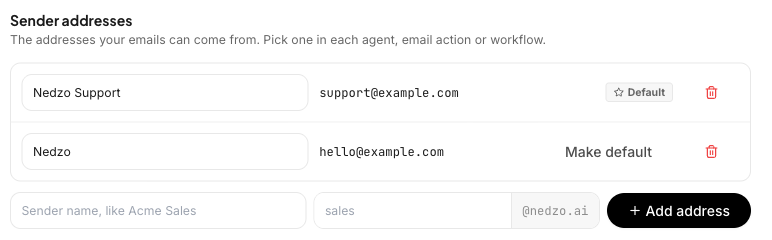
Now you verify your domain once, then add as many sender addresses on it as you need: support@, sales@, billing@. Each address gets a sender name, which is the name people see in their inbox. You pick one as your default.
How to set it up
- Go to Settings, then Channels, then Email.
- Verify your domain with the DNS records Nedzo shows you.
- Add a sender address. Type the sender name and the part before the @, and Nedzo fills in your domain.
- Set one address as the default.
You can't add an address on a domain you haven't verified. The workspace address Nedzo gives you stays as it is, and it still sends and receives with zero setup.
Pick the sender everywhere you send
You choose the From address in three places:
- The Unibox, when you write a new email
- An agent's email action
- A procedure's email step
So a support reply goes out from support@ on your domain, and a sales follow-up from your AI agent goes out from sales@.
Start a free trial and let Nedzo keep your contacts up to date.