
You can now ask your data questions in plain English. Unibox has a new AI assistant tab, right next to Details. Type "How many calls did we get last week?" and you get the answer. Open a conversation and it can sum it up and draft your reply too.
Two more things shipped today. You can test a custom action before a customer ever hits it, and your AI agent now learns from the files, text and web pages you give it.
Ask questions about your CRM data
Getting one number out of a report takes too long. You click through five screens, or you export a sheet and do the math yourself. Most people end up guessing.
Now you open the assistant and ask:
- How many calls came in this week?
- How much did we spend on voice versus chat?
- Which agent handles the calls in this workflow?
- How is my agent doing?
- What is my balance?
The assistant pulls the answer from your workspace. Each number comes with its context, like the date range and the filters it used, so you know what you're looking at.
It answers how-to questions too. Ask "How do I set up a workflow?" and it answers from the Nedzo docs, with links to the pages it used. If it can't reach the docs, it tells you so instead of making up steps.
When your question is unclear, it asks you a follow-up. It's a real chat, so you can keep going back and forth.
Ask about "this call"
Open a conversation and ask about it. You don't need to copy an ID or paste anything.
- Why did this call fail?
- How much did this call cost?
- Who handled this call?
The assistant knows which conversation you have open and answers about that one.
Your data stays yours
The assistant only reads data from your own workspace, and it can't change anything. Secrets like API tokens and webhook links never show up in its answers. If your data is out of reach for a moment, it says so. It won't hand you a made-up number.
An AI copilot for your support inbox
Say a customer has sent 40 messages. Your team reads the whole thread to work out what they want, then types a reply from scratch. Slow replies lose customers.
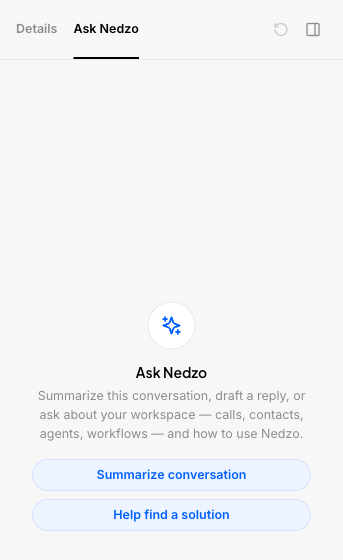
The assistant sees the whole open conversation, plus the contact and their details. Two buttons cover the most common jobs:
- Summarize conversation gives you the story in a few lines.
- Draft a reply writes a response for you.
Like the draft? Copy it, or drop it into the reply box with one click. Then edit it and send. The assistant never sends a message on its own, so a person always makes the final call.
You can also ask about the contact, like "What is she asking for?" or "Does he have an email on file?" The assistant answers from the conversation and the contact's details.
When you switch to another conversation, the panel starts fresh for that one.
Test custom actions before going live
Custom actions let your AI agent call your own systems. Say it needs to look up an order while the customer waits on the line.
Until now you had no way to test one. You found out an action was broken when a real customer hit it.
Now you can test a custom action while you set it up. You fill in the values the action needs, Nedzo runs it, and you see the result or the error. You fix the problem before any customer sees it. Nedzo makes it clear the run was a test.
Train your AI agent on your files, text and website
If your agent doesn't know your prices, it can't quote them.
Now Nedzo stores the content you add to your agent's training so the agent can search it. That covers three kinds of content:
- Files you upload, like a price list or a policy PDF
- Text you paste in
- Website links, where Nedzo reads the page and saves its text
When a customer asks a question, your agent finds the right part of your content and answers from it. This works on chat, web and voice.
If Nedzo can't read a web page, it marks that link as failed, shows you the error and lets you retry. You won't end up with a link that looks fine but teaches your agent nothing.
It's live in your account now.