
Nedzo now has a no-code workflow builder. You pick a trigger, add steps and hit publish. From then on, Nedzo texts, emails and calls your leads for you.
A new lead comes in at 9pm. Nobody calls back until noon the next day, and by then they hired someone else. With a workflow, Nedzo texts that lead, waits ten minutes and has your AI agent call them. It all happens at 9pm, while you sleep.
Four triggers that start a workflow
Every workflow starts with a trigger. You get four.
- Contact Created fires when a new contact lands in Nedzo.
- Contact Tag fires when a tag is added to a contact or removed. You pick which tags it listens for.
- Contact Replied fires when a contact texts you back.
- Call Details fires when a voice call ends.
Call Details does the most. You can filter it by agent, agent type, outcome, call length and call score. Leave the filters empty and it fires on every call.
The workflow gets the full call record: the agent, the contact, how long the call ran, how it ended, its score and the transcript. So you can build rules like "if the call went to voicemail, send a text" or "if the call scored low, tag the contact so a person calls back."
Automated follow up by SMS, email and call
After the trigger, you stack steps.
Make a phone call
Your AI agent calls the contact. You pick the agent and the most follow-ups it can make.
Send SMS
You pick the number to send from and write the text. US and Canada numbers need an approved A2P 10DLC campaign first.
Send email
You pick who gets it: one fixed address or the contact's own email. Then you set the from address, the subject and the message. Nedzo sends it through the email domain you connected.
Condition
You pick a field, a rule and a value. Contacts that match go down the "true" path and everyone else goes down the "false" path. Each path gets its own steps.
Wait
Pause for minutes, hours or days. You can also wait until a day of the week, like next Monday, or until a set date.
Webhook
Send data to any other tool you use. You pick the method (GET, POST, PUT, PATCH or DELETE), the URL, any headers and a JSON body. The body can pull in data from the trigger and from earlier steps.
Create or update a contact
You set the first name, last name, phone, email, company, tags and custom fields. If a contact with that phone or email already exists, Nedzo updates it, so you don't end up with duplicates.
See every run, step by step
Nedzo logs every run in the Executions tab. You see whether it worked, what started it and the data that came in.
A timeline shows each step and what it did. A condition shows which path it took. A webhook shows the reply code, the reply body and any error.
When a lead says "nobody called me", you open the run and check what happened.
Your first follow-up workflow
Copy this one if you buy or collect leads.
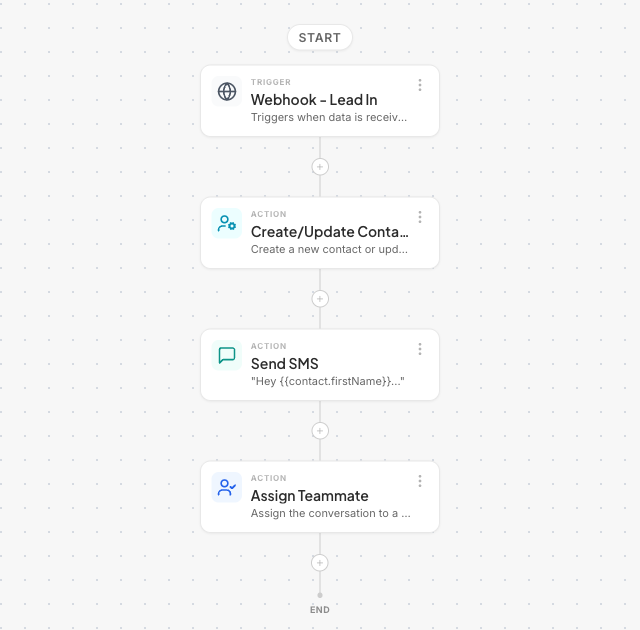
- Trigger: Contact Created.
- Send SMS: "Hi, thanks for your request. We'll call you in a few minutes."
- Wait: 10 minutes.
- Make a phone call: your sales agent calls the lead.
Then build a second one on Call Details, filtered to calls nobody answered. Have it text the lead and ask for a better time to talk.
Start a free trial and build your first workflow today.