
You can now run Nedzo from Claude or ChatGPT. We launched the official Nedzo MCP server. Add it to Claude or ChatGPT as a connector, sign in with your Nedzo login, and ask for what you want in plain words. The AI does it in your account.
Say you want a quick answer, like "who called yesterday and didn't book?" Today you log in, click around, filter and scroll. Now you just ask.
What you can do from chat
The AI can do anything your plan and your role allow. That includes the big stuff: sending messages, placing calls, starting campaigns, adding contacts to workflows, buying numbers, billing and deletes.
Some things you can ask:
- "Who called yesterday and didn't book?"
- "Pause my Black Friday campaign."
- "Text everyone tagged no-show a rebooking link."
- "Which workflow runs failed this week?"
The tools cover your daily work:
- Contacts. Search, add, update, tag, set do not disturb, import.
- Conversations. List them by channel, date or outcome, and read a transcript and summary.
- Sends. SMS, email, WhatsApp, Instagram, Messenger and phone calls.
- Campaigns. Create, start, pause, check results, pull one contact out.
- Workflows. Turn on or off, enroll a contact, check runs, retry or cancel a run.
- Agents. List, read and update your AI agents.
- Account. Your workspaces, usage, balance and phone numbers.
For the rest of the Nedzo public API, like knowledge and templates, there are extra tools built straight from the API. When we add to the API, the AI gets it too.
The same limits as the API apply. Your plan, do not disturb, rate limits and your call limit all still hold. If your plan or role can't use a tool, the AI doesn't see it.
How to connect Claude or ChatGPT
It takes three steps:
- In Claude or ChatGPT, add a custom connector with the address https://mcp.nedzo.ai
- Sign in with your Nedzo login
- Check the screen, then click Approve
You don't need an API key or any code.
The approve screen shows the app's name and the web address the app will send you back to. Check that address. Anyone can name an app "Claude", so the address is the part that tells you who you're really approving.
Our docs have a "Connect Claude or ChatGPT" page with the steps for each app.
A ChatGPT connector for your CRM, with your permissions
The AI only gets what you get. It sees only the workspaces you belong to, and it can only do what your role allows.
Nedzo checks this on every request. If an owner removes you from the account or lowers your role, the change applies on the very next request. Remove a team member, and Nedzo cuts off their connected apps too.
Got more than one workspace? Name it when you ask. If you don't, the AI asks you which one.
See and cut off connected apps
Settings now has a Connected apps section. Each row shows the app, who connected it, when, and when it was last used, plus a Disconnect button.
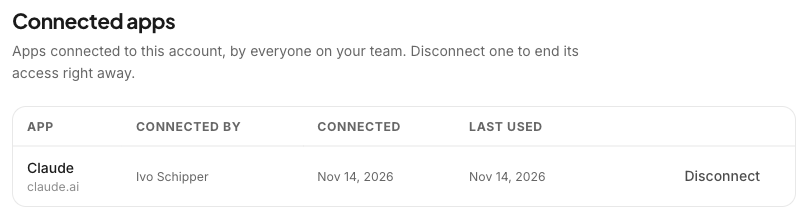
Team members see their own connections. Owners and admins see every connection in the account and can disconnect any of them, which is what you do when an employee leaves. Once you disconnect an app, Nedzo refuses its next request.
Every time someone connects a new app, Nedzo sends a security email with the app's name, the time and a link to Connected apps. If it wasn't you, you find out right away.
Tested before every release
Before each release, we run about 50 requests, written the way owners talk, through both Claude and ChatGPT. Each one has a right answer. If fewer pass than last time, the release doesn't ship.
It's live in your account now. New to Nedzo? Start a free trial.