
You can now answer calls in your browser. Assign teammates to a phone number, pick ring all or round robin, and their browser rings when a call comes in. When a caller asks your AI agent for a person, the agent hands the live call to your team. You don't need a desk phone or a separate app.
This is a big release, so there's more. Nedzo now gives every conversation an outcome, so you can see your AI agent's resolution rate. You can merge duplicate contacts. Your AI agent can book into Calendly team events. And web chat now remembers visitors who come back without leaving a name.
Answer calls in your browser
A caller wants a person. Your AI agent has no way to reach one, so the caller hangs up annoyed. This release fixes that.
Open a phone number and assign the teammates who should take its calls. Then pick how calls ring. With ring all, every teammate rings at once and the first to pick up gets the call. With round robin, each new call goes to the next person on your list. Drag names to change the order.
When a call comes in, a popup shows at the top of your screen, on any page in Nedzo. It shows the caller's number, and their name if they're already a contact. You accept or decline. If a teammate picks up first, your popup goes away. Your browser needs microphone access for this, and Nedzo shows a banner asking for it.
Once you accept, a bar gives you mute, hold, transfer and hang up. Hold plays music to the caller. You can also use the keyboard: M mutes, H holds, T transfers. Calls ring with their own Nedzo ringtone, so you can tell a customer call from every other sound on your computer.
AI call transfer to a human
Say a caller tells your AI agent, "I want to talk to a person." The agent rings the teammates on that number, using the ring setting you picked. Your popup carries a badge that says the call came from the AI agent. You accept and take over.
If nobody picks up within 30 seconds, the caller hears that no one is free, and the AI agent goes back to the conversation. The caller never sits on a dead line.
Your AI agent gets this option as soon as the number has at least one teammate assigned.
Pass a call to a teammate
You can hand a call to any teammate who's online. Pick them from the list and confirm. If they don't answer, you stay on the call. The caller stays connected through every hand-off, from AI to you and from you to a teammate, and the conversation moves with the call to whoever holds it.
Outcome, sentiment and resolution tracking
Your AI agent talks to people all day. Until now, you couldn't tell whether it solved their problems or passed them along.
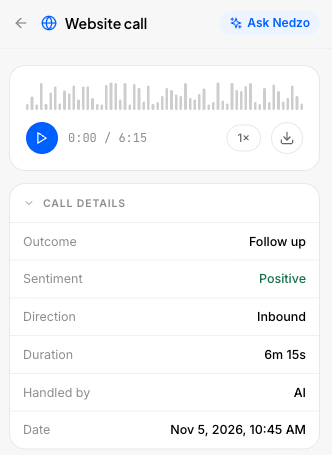
Now every call, chat and email gets an outcome when it ends:
- Confirmed resolution: the customer says the problem is fixed
- Assumed resolution: the agent answered and the customer didn't come back with more
- Qualified or disqualified: for sales agents
- Escalation: the customer asked for a human, or the agent couldn't go on
- Handoff: the agent sent the conversation to a human on purpose, through a handoff procedure you set up
Nedzo also marks each conversation's sentiment as positive, neutral or negative, and flags every escalation. A chat that never got past "hi" counts as no value, so it doesn't skew your numbers.
From there, Nedzo counts each outcome for an agent over a date range, across voice, chat and email. For service agents you get a resolution rate: resolved conversations out of all the ones that ended resolved, escalated or handed off. For sales agents you get a qualification rate: qualified out of qualified plus disqualified.
Merge duplicate contacts
A customer calls from her cell, then emails from work. Now you have two contacts for one person.
Open the contact and merge. You pick which one to keep. Nedzo moves every call, chat, message, note, tag and custom field value onto it. The other contact goes away, but old links to it still work.
Nedzo never merges contacts on its own, so the call is always yours. Your conversation counts stay the same, because the same calls and chats now sit under one person.
Calendly team event booking
Your AI agent can now book into Calendly team event types, not only personal ones. If your team runs round robin or collective events in Calendly, your agent can book them. When you pick the event type, Nedzo labels which ones are personal and which belong to a team.
Conversation attributes
Settings now has a Data area with three parts: Tags, People and Conversations. People holds your contact fields, the ones that used to be called custom fields. Conversations is new. There you can define custom attributes for conversations, separate from your contacts. Nedzo keeps them apart from your contact fields, so they don't show up in your contact pickers.
Remember returning website visitors
Plenty of visitors chat on your site and never give a name. When they come back, you've got no idea you've talked before.
Now web chat saves an anonymous visitor as a contact, even with no name, using their IP address. When they return, Nedzo links the new chat to that same contact, so you see what they asked last time.
Start a free trial and set up browser calling on your first number.