
You can now set a monthly spending limit for each workspace. Cap minutes, messages and wallet spend per client, and pick the day the limit resets. When one client hits their cap, only that client stops, and everyone else keeps going.
We also made SMS opt-outs smarter. Nedzo now catches "please stop texting me", along with STOP.
Agency client spending limits
Here's the nightmare. You run an agency, and all your clients spend from one balance. One client launches a huge campaign on a Friday, and by Monday your balance is gone. Now every other client's calls stop too.
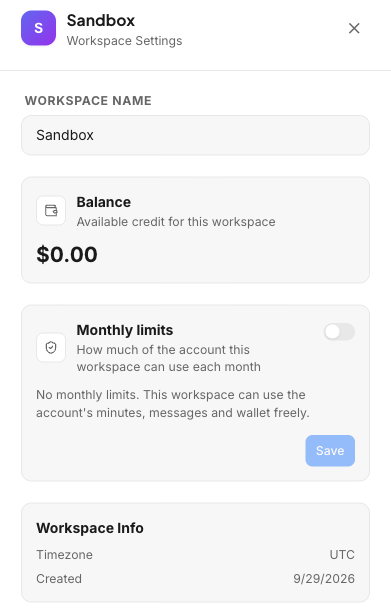
Your account has one balance, and every workspace spends from it. On top of that, you, the account owner, can set a monthly cap for each workspace. One client can't eat the whole balance anymore.
How per-client usage caps work
Each workspace has a Monthly limits card. Flip the switch in its top right corner to turn the limit on.
With the limit on, you can set three caps:
- Minutes
- Messages
- Wallet spend
Then pick the next reset date. The limit repeats every month on that day. Pick October 14, and usage starts over on the 14th of every month. The card shows the next reset date, so you always know when it's coming.
Flip the switch off, and the workspace has no limit.
What happens at the cap
A workspace that hits its cap stops spending. It shows its own banner, so anyone in that workspace sees why. Your other workspaces keep running.
Why the reset day matters
Your clients don't all pay you on the 1st. One pays on the 5th, another on the 20th. Now each workspace's limit can reset on the same day that client pays you, so their usage lines up with their invoice.
SMS opt-out detection beyond the STOP keyword
Customers don't always type STOP. They type "please stop texting me", "remove me from your list" or "don't message me again".
Before, those slipped through and your agent kept texting. That's a fast way to annoy people. Now Nedzo catches them.
How it works
The keyword check stays. STOP, UNSUBSCRIBE, CANCEL, END, QUIT and OPT OUT work every time, the way carriers require.
When a text doesn't match a keyword, Nedzo asks one question: is this person asking not to be contacted again? If the answer is yes, Nedzo turns on Do Not Disturb for that contact, the same as if they typed STOP. The check runs before your agent replies.
"No thanks" doesn't count as an opt-out
A plain "no thanks" or "not interested" doesn't turn on Do Not Disturb. That person said no to an offer. They didn't ask you to never text again, so you can still follow up later with something new.
Start a free trial and set limits for your first client workspace.